Chapter 4: Planning, Designing, and Implementing the Simulation
- Introductionto Smart Grid Wireless Infrastructure Planing (SG-WIP)
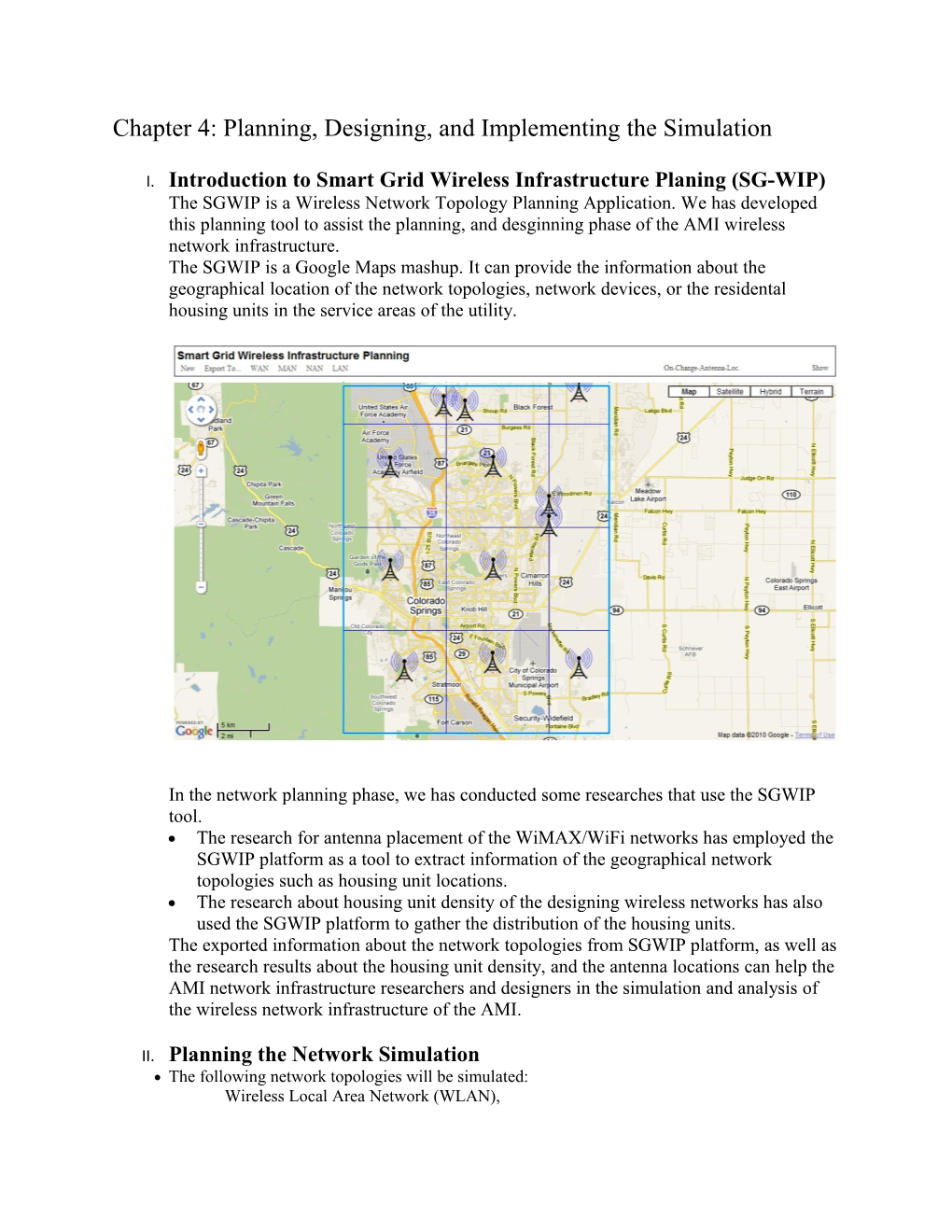
The SGWIP is a Wireless Network Topology Planning Application. We has developed this planning tool to assist the planning, and desginning phase of the AMI wireless network infrastructure.
The SGWIP is a Google Maps mashup. It can provide the information about the geographical location of the network topologies, network devices, or the residental housing units in the service areas of the utility.
In the network planning phase, we has conducted some researches that use the SGWIP tool.
- The research for antenna placement of the WiMAX/WiFi networks has employed the SGWIP platform as a tool to extract information of the geographical network topologies such as housing unit locations.
- The research about housing unit density of the designing wireless networks has also used the SGWIP platform to gather the distribution of the housing units.
The exported information about the network topologies from SGWIP platform, as well as the research results about the housing unit density, and the antenna locations can help the AMI network infrastructure researchers and designers in the simulation and analysis of the wireless network infrastructure of the AMI.
- Planning the Network Simulation
- The following network topologies will be simulated:
Wireless Local Area Network (WLAN),
Wireless Neighborhood Area Network (WNAN),
Wireless Metropolitan Area Network (WMAN),
Wide Area Network (WAN)
- The main purpose is for evaluating the network throughput of the Hybrid WiMax/WiFi Infrastructure that will be employed for the AMI meter reading reporting application
- Network topologies
- WiMax, WiFi technologies
- Grid Topology: pre-defined distance between wireless nodes
- Adequate bandwidth data link connection
- Applications
- Traffic pattern: Up-link data flows from the Smart Meter nodes to the Utilities Data Center node
- Each Smart Meter sends one meter reading message to the Data Center in every second. The network throughput is calculated based on the number of arrived messages in every second at the Data center.
- The network throughput is measured from many simulation scenarios that have the inputs:
- Number of Smart Meter nodes
- Number of Wireless Mesh Hops, and Access Points
- Number of Wimax/WiFi Gateways
- Number of WiMAX Base Stations
- The transmission delay (Tx Delay) of a meter data message is designed to measure the average delay of the transmission of a meter data message throughout the network infrastructure.
- Designing the Network Simulation
- Physical Network Model:
- Hybrid WMN Architecture
- WiMAX/WiFi Network Infrastructure
Basically, the WM Communication Network component provides the data transportation services. The requests and responses from Meter Data Center component and Wi-Fi Smart Meter component will be delivered by the using to the transportation services of WM Communication Network component.
The WM Communication Network component has three layers of network services like the first three layers of the OSI model:
The WM Communication Network is an integrated Wireless Mesh Network (WMN), which uses Wi-Fi and WiMAX technologies. The WM Communication Network has the WiMAX Base Station, the WiMAX/Wi-Fi Gateway, and Wi-Fi Dual Band Mesh Routers.
- NS-3 WiMAX/WiFi network models
- Application Model:
- Client-Server architecture
The AMI has three components that are Meter Data Center, Wireless Mesh (WM) Communication Network, and Wi-Fi (WF) Smart Meter.
The Meter Data Center component accesses the WF Smart Meter’s reading via the WM Communication Network.
- NS-3 Server application: An UDP protocol Server. It receives the meter messages.
- NS-3 Client application: An UDP protocol Client. It sends the meter messages to the Server.
- WLAN Simulation
- Topology Configuration
- Standard: WiFi IEEE 802.11b
- Connection mode: Infrastructure
- Smart Meter (SM) at random position within the coverage area of the correspondingAP
- The WiFi AP has the coverage range of 100 meters
- Number of SMs: [1 – 100]
- WiFi link capacity: 11Mbps
- Application Configuration
- Server application is installed on the AP.
- Client application is installed on SM.
- Each Client application will send onemeter message with 20 bytes length to the Server application by using the Internet protocol UDP.
- The Client application’s Data-Rate property is set to 20 bytes x 8 bits = 160bps = 0.160kbps
- Simulation Planning
- Repeatedly running the simulation scenarios with the different number of SMs
- Output: the network throughput, Tx Delay
- Results Analysis and Conclusion
- Calculate the average network throughput, Tx delay
- Conclusion: Do the AP receive all of the messages from the SMs in 1 second?
- WNAN Simulation
- Topology Configuration
- Standard: WiFi IEEE 802.11a
- Connection mode: Mesh
- The Mesh Routers (MR) /Access Points (AP) are installed in the Grid topology
- Distance between adjacent nodes (horizontal and vertical): 200 meters
- Number of MRs/APs: [1 – 9]
- WiFi link capacity: 54Mbps
- Application Configuration
- Server application is installed on the Gateway (GW).
- Client application is installed on APs.
- Each Client application will send 100 messages, which have 20 bytes length, to the Server application by using the Internet protocol UDP.
- The Client application’s Data-Rate propertyis set to 100 x 20 bytes x 8 bits = 16000bps = 16kbps
- Simulation Planning
- Repeatedly running the simulation scenarios with the different number of MRs and APs
- Output: the network throughput, Tx delay
- Results Analysis and Conclusion
- Calculate the average network throughput, Tx delay
- Conclusion: Do the GW receive all of the messages from the APs in 1 second?
- WMAN Simulation
- Topology Configuration
- Standard: WiMAX IEEE 802.16d
- Connection mode: Point-To-MultiPoint
- The Subscribers (SS)/Gateways (GW) are installed in the grid topology
- Distance between adjacent nodes (horizontal and vertical): 1,000 meters
- Number of SSs/GWs: [1 -10]
- WiMAX link capacity: 4Mbps
- Application Configuration
- Server application is installed on the Base Station (BS).
- Client application is installed on SSs.
- Client application will send 900 messages, which have 20 bytes length, to the Server application by using the Internet protocol UDP.
- The Client application’s Data-Rate propertyis set to 900 x 20 bytes x 8 bits = 144,000bps = 144kbps
- Simulation Planning
- Repeatedly running the simulation scenarios with the different number of SSs/GWs
- Output: the network throughput, Tx delay
- Results Analysis and Conclusion
- Calculate the average network throughput, Tx delay
- Conclusion: Do the BS receive all of the messages from the SSs/GWs in 1 second?
- WAN Simulation
- Topology Configuration
- Standard: Ethernet EEE 802.3
- Connection mode: Point-To-Point
- The BSs are connected to the Hub (or Data Center) in the Star topology
- Number of BS: [1-20]
- Ethernet link capacity: 10Mbps
- Application Configuration
- Server application is installed on the Hub (or DC)
- Client application is installed on BSs.
- Client application will send 9,000 messages, which have 20 bytes length, to the Server application by using the Internet protocol UDP.
- The Client application’s Data-Rate propertyis set to 9,000 x 20 bytes x 8 bits = 1,440,000bps = 1.44Mbps
- Simulation Planning
- Repeatedly running the simulation scenarios with the different number of BSs
- Output: the network throughput, Tx delay
- Results Analysis and Conclusion
- Calculate the average network throughput, Tx delay
- Conclusion: Do the DC receive all of the messages from the BSs in 1 second?
- Implementing the Network Simulation
- WLAN Simulation
- NS-3 Script
- Name: sm-ap-sim.cc
- Description: This script implements the network model that simulates the AMI meter data reporting process in a WLAN topology. The simulation scenarios have one WiFi Access Point (AP) and a number of the smart meters (SM). The network devices are layout in a grid topology.The AMI meter data reporting application will send the meter messages from the SMs to the AP.
The source code of this script is in the Appendix session.
- Syntax:
- Input:
nbSM - number of smart meter nodes to create [1]
duration - duration of the simulation in seconds [10]
verbose - turn on all WimaxNetDevice log components [false]
data-rate - packet data rate [0.160kbps]
statistic-start - the statistic is started at (second) [0]
- Output:
In every second:
Transmit (Tx) Packets, Receive (Rx) Packets, and Maximum Tx Delay
In simulation period:
Average Transmit (Tx), Receive (Rx), and Transmit Delay (TxDelay)
- Linux Shell Script
- Name: sm-ap-sim.sh
- Description: Batch running the WLAN simulation application. This shell script generates many WLAN simulation scenarios. Then it simulates the scenarios, and logs the simulation results in the text files.
- Syntax:
- Input: none
- Output:
List of the log file names that store the simulation results
- WNAN Simulation
- NS-3 Script
- Name: ap-gw-sim.cc
- Description: This script implements thenetwork model that simulates the AMI meter data reporting process in a WNAN topology. The simulation scenarios have one WiMAX/WiFi gateway and a number of the mesh routers. The network devices are layout in a grid topology. Some of the mesh routers are configured as the APs. The AMI meter data reporting application will send the meter messages from the APs to the gateway.
The source code of this script is in the Appendix session.
- Syntax:
- Input:
x-size - number of columns of the grid [3]
y-size - Number of rows of the grid [3]
step - distance between two adjacent nodes (meter) [190]
access-points - number of WiFi APs [1]
data-rate - packet data rate [20kbps]
statistic-start - the statistic is started at (second) [0]
- Output:
In every second:
Transmit (Tx) Packets, Receive (Rx) Packets, and Maximum Tx Delay
In simulation period:
Average Transmit (Tx), Receive (Rx), and Transmit Delay (TxDelay)
- Linux Shell Script
- Name:ap-gw-sim.sh
- Description: Batch running the WNAN simulation application. This shell script generates many WNAN simulation scenarios. Then it simulates the scenarios, and logs the simulation results in the text files.
- Syntax:
- Input: none
- Output:
List of the log file names that store the simulation results
- WMAN Simulation
- NS-3 Script
- Name: gw-bs-sim.cc
- Description: This script implements the network model that simulates the AMI meter data reporting process in a WMAN topology. The simulation scenarios have one WiMAX Base Station and a number of the Subscriber Stations (or WiMAX/WiFi Gateways). The network devices are layout in a grid topology. The AMI meter data reporting application will send the meter messages from the Subscriber Stations to the Base Station.
The source code of this script is in the Appendix session.
- Syntax:
- Input:
nbSS - number of subscriber station to create [1]
scheduler - type of scheduler to use with the network devices [0]
duration - duration of the simulation (second) [10]
verbose - turn on all WimaxNetDevice log components [false]
data-rate - packet data rate [144kbps]
statistic-start - statistic started at (second) [0]
- Output:
In every second:
Transmit (Tx) Packets, Receive (Rx) Packets, and Maximum Tx Delay
In simulation period:
Average Transmit (Tx), Receive (Rx), and Transmit Delay (TxDelay)
- Linux Shell Script
- Name: gw-bs-sim.sh
- Description: Batch running the WMAN simulation application. This shell script generates many WMAN simulation scenarios. Then it simulates the scenarios, and logs the simulation results in the text files.
- Syntax:
- Input: none
- Output:
List of the log file names that store the simulation results
- WAN Simulation
- NS-3 Script
- Name: bs-dc-sim.cc
- Description: This script implements the network model that simulates the AMI meter data reporting process in a MAN topology. The simulation scenarios have one Hub and a number of the WiMAX Base Stations. The network devices are layout in a star topology. The AMI meter data reporting application will send the meter messages from the Base Stations to the Hub node (or the Data Center).
The source code of this script is in the Appendix session.
- Syntax:
- Input:
nbBS - number of base station to create [1]
duration - duration of the simulation (second) [10]
verbose - turn on all WimaxNetDevice log components [false]
data-rate - packet data rate [1.44Mbps]
statistic-start - statistic started at (second) [0]
- Output:
In every second:
Transmit (Tx) Packets, Receive (Rx) Packets, and Maximum Tx Delay
In simulation period:
Average Transmit (Tx), Receive (Rx), and Transmit Delay (TxDelay)
- Linux Shell Script
- Name: bs-dc-sim.sh
- Description: Batch running the WAN simulation application. This shell script generates many WAN simulation scenarios. Then it simulates the scenarios, and logs the simulation results in the text files.
- Syntax:
- Input: none
- Output:
List of the log file names that store the simulation results